
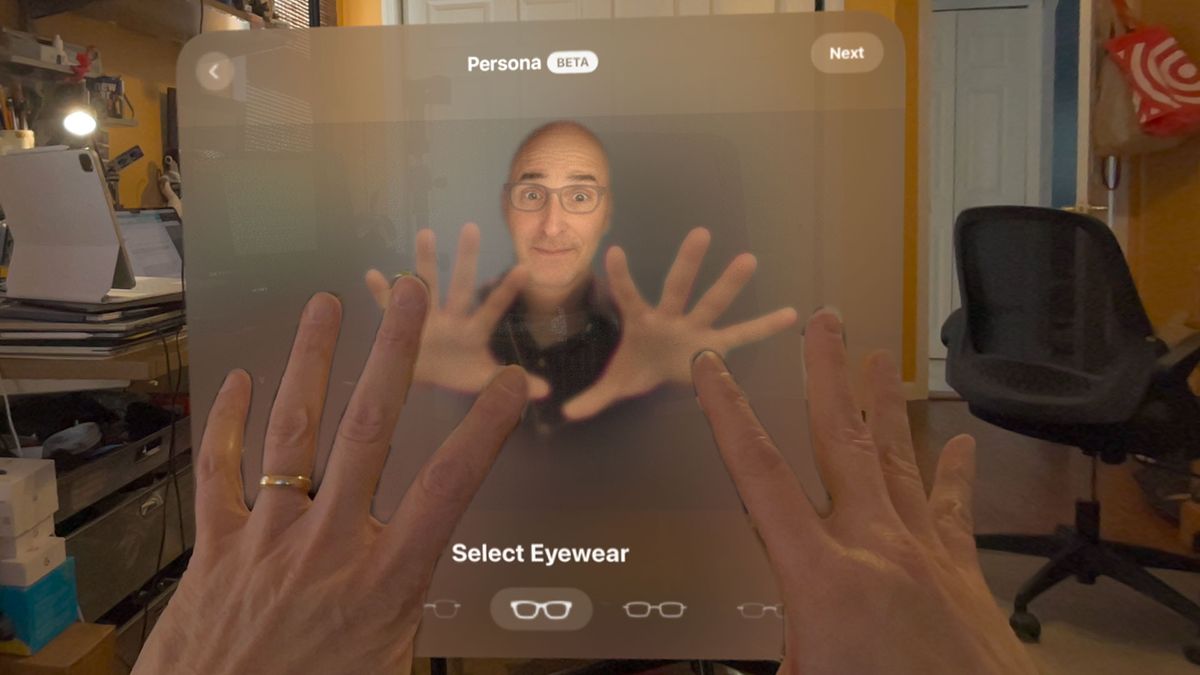
I finally look slightly less creepy in my Apple Vision Pro mixed reality headset. Oh, no, I don’t mean I look less like an oddball when I wear it but if you happen to call me on FaceTime, you’ll probably find my custom Persona – digital Lance – a little less weird.
While Apple Vision Pro hasn’t been on the market very long and the $3,499 headset is not owned in iPhone numbers (think tens of thousands, not millions) this first big visionOS update is important.
I found it under Settings when I donned the headset for the first time in a week (yes, it’s true, I don’t find myself using the Vision Pro as often as I would my pocketable iPhone) and quickly accepted the update. It took around 15 minutes for the download and installation to complete.
VisionOS 1.1 adds, among other things, enterprise-level Mobile Device Management (MDM) controls, closed captions and virtual keyboard improvements, enhanced Home View control, and the aforementioned Persona improvements.
I didn’t test all of these features, but I couldn’t wait to try out the updated Personas. Despite the update, Personas remains a “beta” feature. visionOS 1.1 improves the quality of Personas and adds a hands-free creation option.
Before we start, here’s a look at my old Vision Pro Persona. Don’t look away.
Image 1 of 3

Personas are Vision Pro’s digital versions of you that you can use in video conference calls on FaceTime and other supported platforms. The 3D image is not a video feed of your face. Instead, Vision Pro creates this digital simulacrum based on a Spatial Photography capture of your face. Even the glasses I have on my Persona are not real.
During my initial Vision Pro review, I followed Apple’s in-headset instructions and held the Vision Pro in front of my face with the shiny glass front facing me. Vision Pro’s voice guidance told me to slowly look left, right, up, and down, and to make a few facial expressions. All this lets the stereo cameras capture a 3D image map of my face.
Because there are also cameras inside the headset to track my eyes (and eyebrows) and a pair of cameras on the outside of the headset that points down at my face and hands, the Vision Pro can, based on how I move my face (and hands), manipulate my digital persona like a puppet.
There’s some agreement that Apple Vision Pro Personas look a lot like us but also ride the line between reality and the awful, uncanny valley. This update is ostensibly designed to help with that.

Apple, though, added a new wrinkle to the process. Now I could capture my Persona “hands-free” which sounds great, but means putting Vision Pro on a table or shelf and then positioning yourself in front of the headset. Good luck finding a platform that’s at the exact right height. I used a shelf in our home office but had to crouch down to get my face to where Vision Pro could properly read it. On the other hand, I didn’t have to hold the 600g headset up in front of my face. Hand capture still happens while you’re wearing the headset.
Image 1 of 3
It took a minute or so for Vision Pro to build my new Persona (see above). The result looks a lot like me and is, in my estimation, less creepy. It still matches my expressions and hand movements almost perfectly. Where my original Persona looked like it lacked a soul, this one has more warmth. I also noticed that the capture appears more expansive. My ears and bald head look a little more complete and I can see more of my clothing. I feel like a full-body scan and total Persona won’t be far behind.
This by itself makes the visionOS 1.1 update worthwhile.

Other useful feature updates include the ability to remove system apps from the Home View. To do so, I looked at an app, in this case, Files, and pinched my thumb and forefinger together until the “Remove App” message appeared.
Apple also says it updated the virtual keyboard. In my initial review, I found this keyboard one of the weakest Vision Pro features. It’s really hard to type accurately on this floating screen and you can only use two fingers at a time. My accuracy was terrible. In the update, accuracy and the AI that guesses what you intended to type appears somewhat improved.
Overall, it’s nice to see Apple moving quickly to roll out features and updates to its powerful spatial computing platform. I’m not sure hands-free spatial scanning is truly useful, but I can report that my digital persona will no longer send you screaming from the room.